
ExamPapers
Prints students' details on answer sheets for automatic marking, and prepares committees and seat numbers from Noor data.


Download
Download it to install for the first time, or install the new version over yours to update.
Current version: 3.2.81
Released 03/01/1447 AH
Tutorials
Videos on installing, importing data, setting up committees and printing on answer sheets.
What's new in this version
- New templates, including one for the Nafs exam.
- The new third-secondary subjects and the new track subjects.
- New templates for Remark Office and Al-Mekna, with control of the shading letters' direction in Remark Office templates.
- Better course import, and the table problem fixed.
- Support for B-Mark.
Please note
- When you install an update of a program you activated before, you need no new licence: activate it with the same mobile number.
- A licence that was requested and sent to you counts as used and cannot be changed.
- Changing the school name or the mobile number on a licence needs a new, paid licence.
- Each computer has its own licence, which cannot be moved to another computer or changed.
- The licence stops working if the program's folder on the computer changes: move it back to where it was.
- Free updates stop if the program is not updated for two years in a row, so update it at least once a year. Updates are free.
- Each school (or stage: primary, intermediate or secondary) and each computer has its own licence, tied to the computer's parts. It is lost if the computer or one of its parts changes, such as the motherboard, hard disk, memory, processor or network card.
- Activation is by mobile number. If it does not go through, ask for the licence to be reactivated on the same computer, free of charge if it was activated before.
Some of what it does
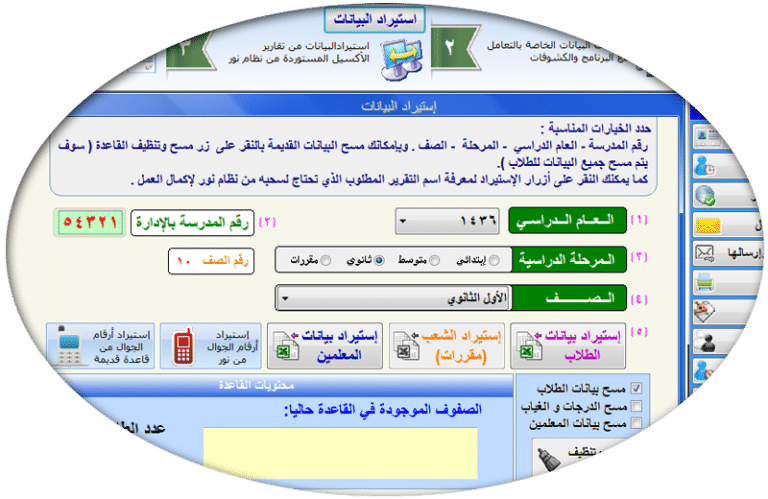
Import data from Noor
Imports what the school needs, some from Excel files and some automatically, straight from Noor:
- Student records.
- Teacher records.
- Contact numbers of students and teachers.
- Students' passwords.
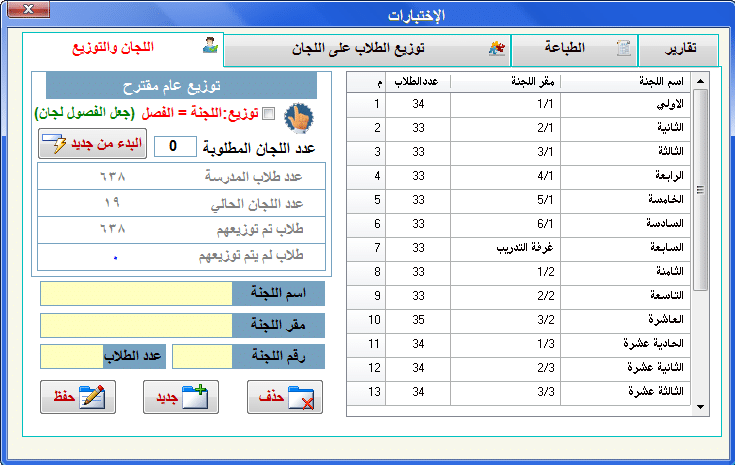
Exam control in one place
Prepares the whole of the exam work: seating students, setting up committees and seat numbers, printing stickers and call lists, and much more.
Works with the marking programs on the market
It supports:
- Zidan (Z-Mark).
- Remark Office.
- Al-Mekna.
Any other program on the market can be supported in future.
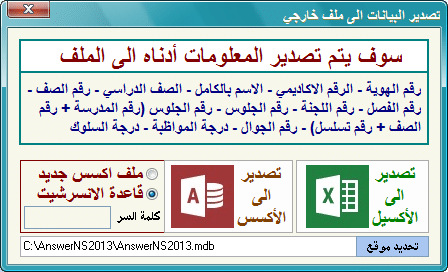
Export to automatic marking
Exports all the marking data to the marking programs: ID number, full name, grade, grade number, class number, committee number, seat number (alone or with the grade or school number), sequence, mobile number and behaviour grade, to an Excel file or a database table.
And more
It pulls each student's full details from Noor or Maarif (student number, seat number, name, school, subject, school year, grade, term, exam type and so on), then prints them and shades their boxes on the student's own answer sheet for the marking machine, with high accuracy, so marking goes smoothly.
Among its features
- Pulls examinee details from the Maarif database or any other, so it suits schools, institutes and universities, with one answer sheet per student carrying all their details.
- No paper wasted printing student details.
- Full control of where the shading goes in every part of the sheet.
- Print one student, a group, a whole class or a whole grade.
- Check grades entered by hand after automatic marking, through Zidan or the marking machine's own program, for those who do not want grades moved automatically.
- Move grades automatically from Z-Mark to Maarif, with no typing.
- Print on any answer-sheet form for the marking machine: Z-Mark, Remark Office or Al-Mekna.
- Print the Arabic and the English form.
- Save the print alignment settings.
- Analysis of each item's difficulty and discrimination (for Z-Mark).
- Find the questions the top group got wrong, automatically (for Z-Mark).
- Chart difficulty against discrimination to judge the exam (for Z-Mark).
- Check the marking machine is working well (for Z-Mark).
- Extract and print the model answer (for Z-Mark).
- Extract any student's answers and compare them with the model answer in Excel (for Z-Mark).
- Print name lists by seat number from Zidan to match the Maarif committee names (for Z-Mark).
- An exam effectiveness report for every subject (for Z-Mark).
- Print students' committee lists by class, so each student knows where to sit before the exam.
- Print student stickers.
Common questions
How many licences does the price include? Do they expire? When would I lose mine?
The price includes three licences for one computer, one school and one stage. A licence does not expire: it lasts for the life of your computer. It is lost if the licensed computer changes, or its processor, motherboard or hard disk changes, and on some computers its memory or network card too.
How do I activate two schools on one computer?
Ask for an extra licence for the second school with a different mobile number, and install it in a different folder from the first school, for example one on drive C and the other on drive D.
Do I lose the licence if the computer is formatted? How do I activate it again?
No, the licence stays valid. Download the latest version from the program's page; when the activation window appears after you run it, enter the mobile number and the licence is activated on your computer automatically.
How is the program supported? Is support free?
Tell us about the problem on WhatsApp or through the customer service page. Support is free, and we will help you solve it as quickly as we can.
I do not know how to set the program up. Can you help? Do you serve girls' schools?
Yes. On the customer service page, choose the kind of help that suits your needs and budget. The program works in boys' and girls' schools, and support is open to all.
How do I update the program?
Download the latest version from the program's page and install it over the version on your computer. Close the program first; better still, restart the computer and then install the newer version. Updating from inside the program is coming.
I have ideas and sheets I would like the program to support. How do I send them?
We welcome anything that makes work in schools easier and better. Write to us through the customer service page or on WhatsApp at 0541444708, and look for it in the coming releases.
I have used all three licences. How do I get a fourth?
The fourth licence and any after it cost SAR 200 each.